In this post I am going to share my experience with IBM Personal C0mputer APL version 1.00. As with the previous posts from this blog post series I am not going into the details of the language itself, but rather share my first impressions from working with APL and try to extrapolate what might be working professionally with it back in 1983.
According the documentation it was released in May 1983. This makes it the first programming language IBM released after PC-DOS 2.00 which was released in March 1983. The first thing that caught my eye was the documentation cover title “APL by IBM Madrid Scientific Center”. This resonated with the only two facts I knew about APL – it was created by Kenneth Iverson who is ACM Turing Award laureate and the language reputation for heavily using mathematical notation. So far, the programming languages I previously covered in this blog post series were implemented by Microsoft, so I was curious to see what IBM implemented for IBM PC.
My work setup is same as before – a Bulgarian clone of IBM PC with 256KB, math coprocessor, CGA monitor and two 360KB floppy drives. Also, my learning approach was same as before – I mostly relied on reading the official IBM documentation, and when necessary time correct books from early 1980s. So, I started reading the documentation. Just after a couple of pages I read the requirement for 8087 coprocessor. On one hand, this was a pleasant surprise considering my experience with IBM Fortran Compiler 1.00/2.00. On the other hand, Intel 8087 coprocessor was quite expensive in the early 1980s so IBM PC APL was meant as a niche product. On the software side IBM PC APL version 1.00 requires PC-DOS 2.00 which supports 360KB floppies and thus made my life much easier as working with old floppy disks on old hardware could be nerve-wracking.
As I said, I had no previous knowledge about APL so I was surprised to see what happened when I run APL.EXE
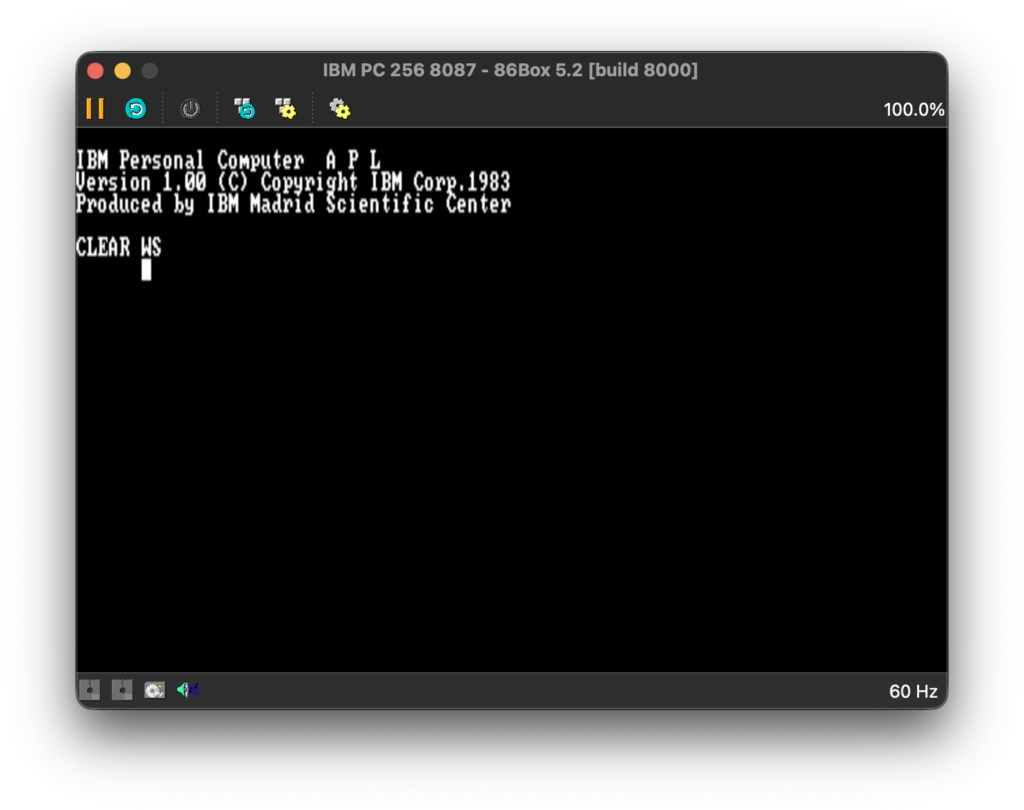
NOTE: As usual I am going to use screenshots from a PC emulator rather than taking poor quality pictures with my mobile phone. My initial intention was to use Marty PC emulator as it helped me a lot in my previous projects. However, at the time of writing, it has no official support for 8087. After I a quick internet search I’ve found 86Box project which I am going to use for making screeenshots for this post.
One of the perks of working with actual hardware, and in my case with quite old hardware, is that you constantly get audio and video feedback. A few seconds after I run APL.EXE I heard the familiar “click” sound when my old CGA monitor changes video mode and I saw what definitely is graphics mode. It didn’t surprised me because, as I said, I knew about the language reputation for using mathematical notation, and it makes sense use graphics mode to render mathematical symbols. Frankly, I find it a bold move considering how many years later PC-DOS 5.00 would be the first DOS supporting *.CPI files and custom code pages. Many other software developers would bend the language specification/requirements and implement plain text environment. In the case of APL it only shows how much important is the visual use of mathematical notation.
Now, I have to discuss somewhat controversial topic. APL is designed to be used with custom keyboard layout. This was well documented and IBM even provided nice keyboard drawings to make the learning process easier. So, I had to print the documentation and look at drawings whenever I was not sure where a symbol is located.
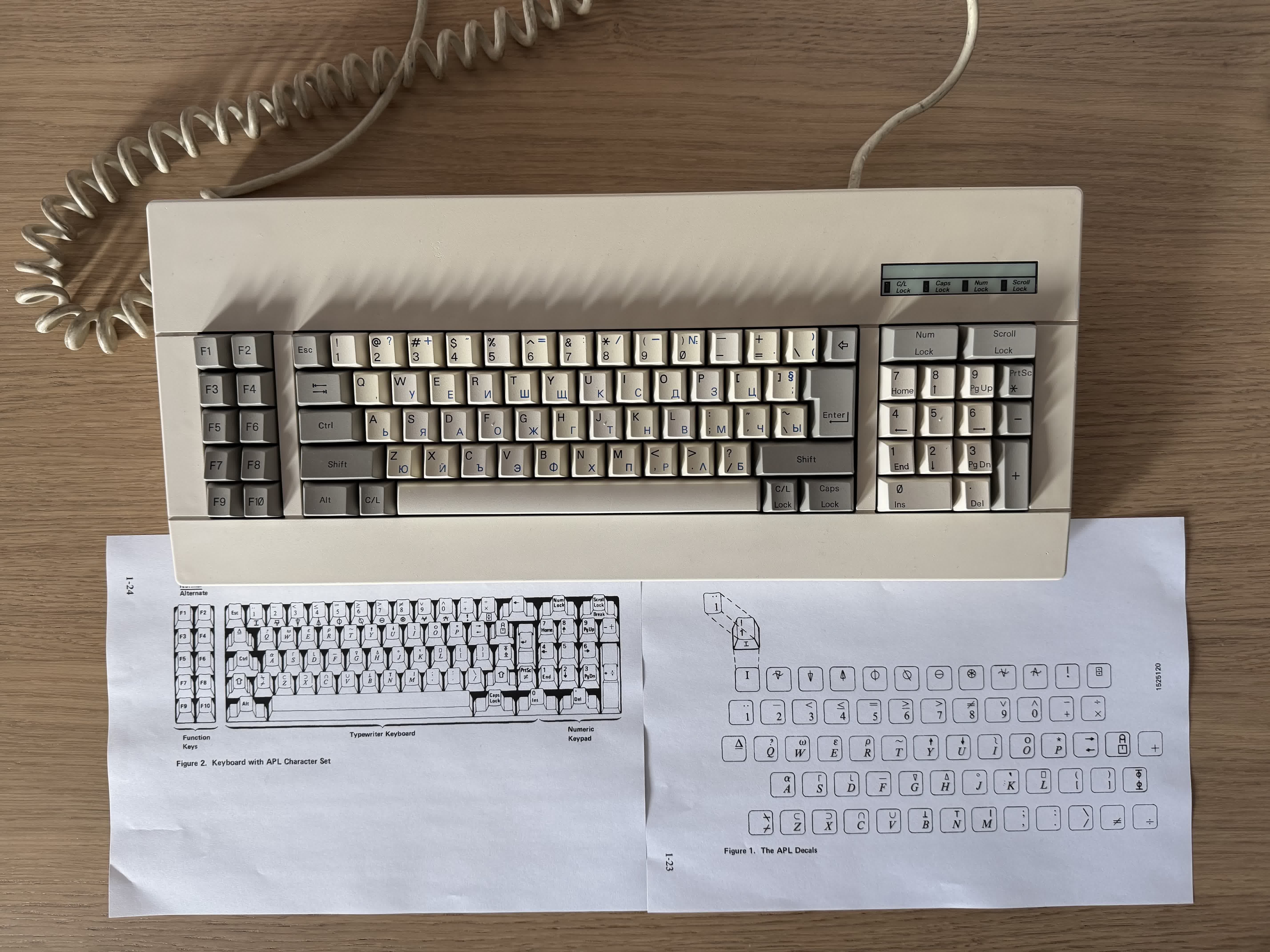
I am not going to discuss key overstriking, but I can relate to the people who are complaining about it. It took me a few days to become semi-fluent in typing APL programs. What I find fascinating is that even today’s modern APL implementations follow the same input methods as in 1980s (to be fair, they also support more ergonomic input methods).
Having put this issue aside, APL also use unpopular way to parse expressions. While there is nothing inherently wrong with it, there are good reasons why we use the current standardized way to define precedence. In short (and somewhat oversimplified), APL has no order of operations and expressions are evaluated right to left. As I said, there is nothing wrong per se, but this could surprise a lot of people in the beginning.
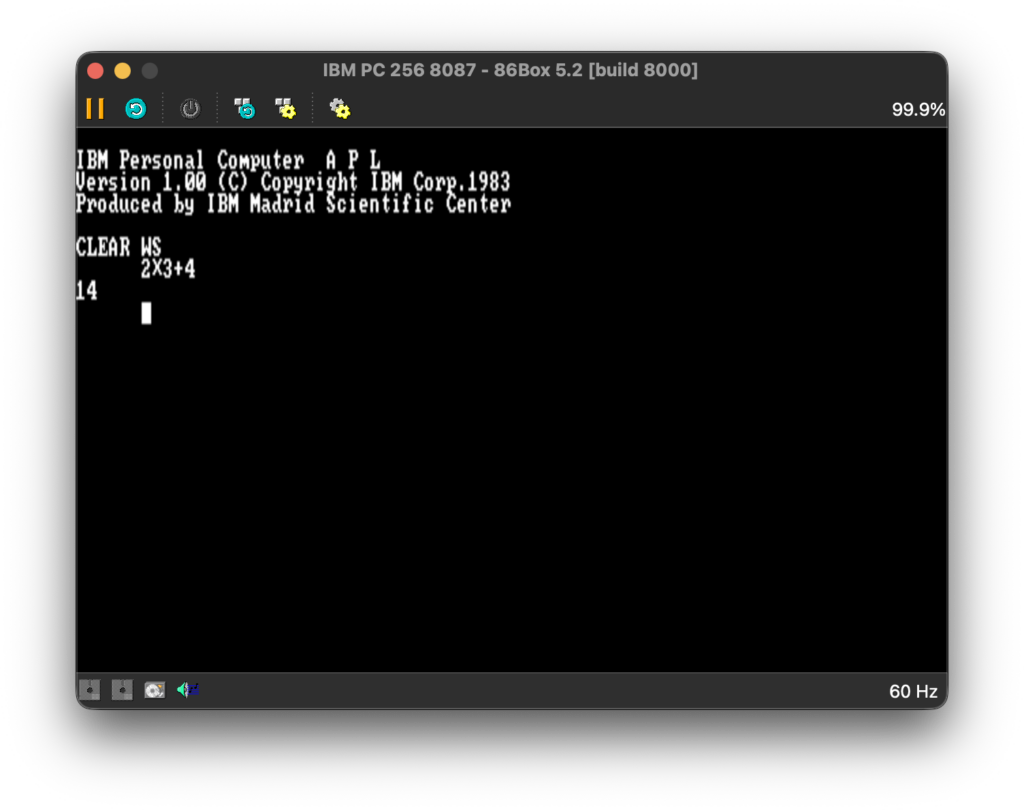
I have to say that I had to be focused when I was typing math expressions and maybe I used parenthesis a little too much, but better safe than sorry.
Before I discuss the APL work environment, I am going to share my thoughts on the idea of using work environment when it comes to programming languages. I fully appreciate using work environment in specialized software like CAD/CAM, computing systems like Mathematica and Maple, or even game development software like Unity, but I don’t think it is a good idea to have specialized work environment for a programming language. Logo is an exception rather than a rule. Work environments for programming languages can be a great thing for educational purposes, but not when they are used professionally. We solved the problem of standardization of execution of the programs we write, by standardizing the interpreters, compilers, runtimes/virtual machines, and even docker/kubernetes if you will. I do understand the mainframe legacy of APL, for example in IBM/360, but when you design a product for personal computers, as in the name of IBM PC, you must adapt to new the requirements. That being said, the APL work environment offers the concept of workspace (*.AIO files). This makes it relatively easy to organize and/or migrate code.
After I’ve got basic knowledge about APL and its environment, it was time to decide what I should implement. As with COBOL, I had a hard time deciding what to implement. APL is often regarded as an excellent language for array processing, especially when mathematical operations are heavily involved. The hardware requirement for math coprocessor also suggests this. I don’t know whether APL uses row-major order and column-major order, so I decided to implement a program that calculates matrix determinant and check it in practice. I’ve decided to go with the classic Gaussian elimination algorithm (mostly naive implementation).
 R←CALCDET A;M;N;I;J;K;T;P
 M←A
 N←1↑⍴M
 P←1
 I←1
L1:→(I>N)/L7
 K ←I
 J←I
L2:J←J+1
 →(J>N)/L3
 →((|M[J;I])≤|M[K;I])/L2
 K←J
 →L2
L3:→(K=I)/L4
 T←M[I;]
 M[I;]←M[K;]
 M[K;]←T
 P←-P
L4:→(M[I;I]=0)/L8
 J←I
L5:J←J+1
 →(J>N)/L6
 M[J;]←M[J;]-(M[J;I]÷M[I;I])×M[I;]
 →L5
L6:I←I+1
 →L1
L7:R←P××/1 1⍉M
 →0
L8:R←0
Not knowing much about APL, I was satisfied with the program. That was until I was reading the documentation how to do more advanced function printing and/or editing when I saw that IBM had also provided an example program that calculates matrix determinant.
 Z←DET A;B;P;I
 I←⌷IO
 Z←1
L:P←(|A[;I])⍳⌈/|A[;I]
 →(P=I)/LL
 A[I,P;]←A[P,I;]
 Z←-Z
LL:Z←Z×B←A[I;I]
 →(0 1∨.=Z,1↑⍴A)/0
 A←1 1↓A-(A[;I]÷B)∘.×A[I;]
 →L
I saw that IBM implementation is much faster than mine so I started to analyze the function. While their implementation is not hard to grasp (tricks like A[I,P;]←A[P,I;] are nice, but are just tricks) I realized that I probably won’t easily come with the idea for this concrete implementation.
This provoked me to think. At first glance both implementations use the same Gaussian elimination algorithm. Yet, one is much more efficient than the other. Think about the following oversimplified example. You can do multiplication by doing addition over and over again, or use the traits of positional number system. In both cases the end result will be the same, but the former is much less efficient than the latter. A programmer can easily detect and understand explicit loops. However, the problem becomes much less explicit when a chain of function composition is involved. To solve this kind of problems you must have deep knowledge of the programming language and its libraries or built-in functions. This problem is not unique to APL, but so far I haven’t seen another language where it is so noticeable.
All this was a bit disheartening, so I needed a revenge. The way APL documentation is organized is a bit strange. Right after the introduction chapters, the documentation explains what APL auxiliary processors are and how to implement ones. In short, auxiliary processors are a way to escape the work environment and communicate with the operating system and/or hardware. So, I decided to implement an auxiliary processor that calculates matrix determinant using 8087 coprocessor. This time I decided to use Bareiss algorithm. Due to the technical limitations of auxiliary processors I had to constrain the matix elements to integers in the range -32768 to 32767. Not a fair play, but it was all about revenge. The actual implementation is a bit naive and not well optimized, but I was currious how well the built-in APL functions utilize the math coprocessor. My expectation was that my implementation will be on par with IBM implementation.
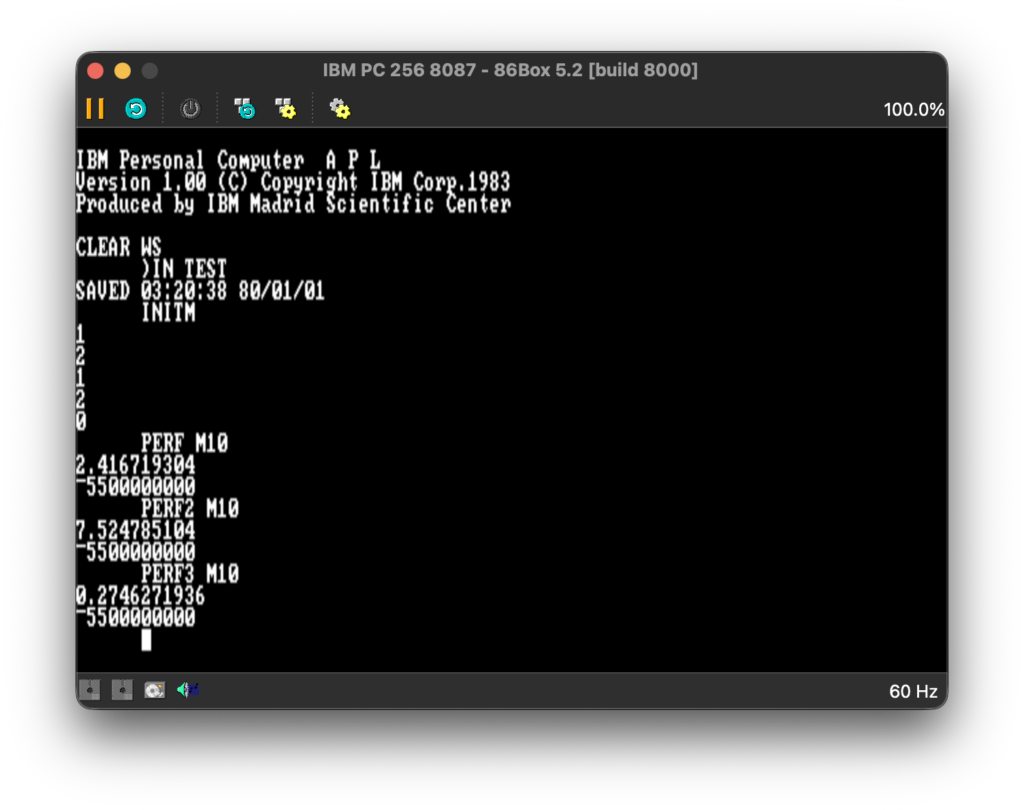
PERF measures the implementation provided by IBM, PERF2 measures my implementation in APL, and PERF3 measures my implementation in 8087 assembly. As someone who wrote professionally for few years performance and memory profilers I have to make the disclaimer that I also measure the time for ⌷PK to access 0040:006C and that the DOS timer frequency is 18.2065 Hz which for this particular scenario is good enough. Using ⌷PK provided much more stable times than using ⌷AI. Interestingly, the actual values on my IBM PC clone are slightly higher, which only shows that while 86Box is faster, it is a quite precise emulator. Having said that, I was very surprised. As I said, my Bareiss implementation is a bit naive and there is a lot of room for optimizations. Still, it is almost 9 times faster. This is a sure sign that APL uses 8087 sporadically, probably for some very narrow scenarios, like sine/cosine (using ○ circular function) or logarithm (using ⍟ function). You can find the source code and floppy disk image here.
In conclusion, I think IBM Personal Computer APL version 1.00 was good enough product for its time. My main concern is that writing performant APL is harder compared to other languages I know. In hindsight the requirement for custom keyboard layout also didn’t help APL to become more popular. Having said that, APL is a niche language, but still used in some financial organizations. While there are reports that it is still used for data analysis and scientific computing, my research shows that it is extremely rare.